Word to PDF Converter
A Word-to-PDF conversion service built as five microservices on Kubernetes, with RabbitMQ queues for asynchronous processing, MongoDB GridFS for file storage and JWT authentication. Designed to absorb up to 50,000 conversion requests.
- independently scaled services
- 5
- conversion requests handled via queueing
- 50,000
- converter replicas consuming in parallel
- 4
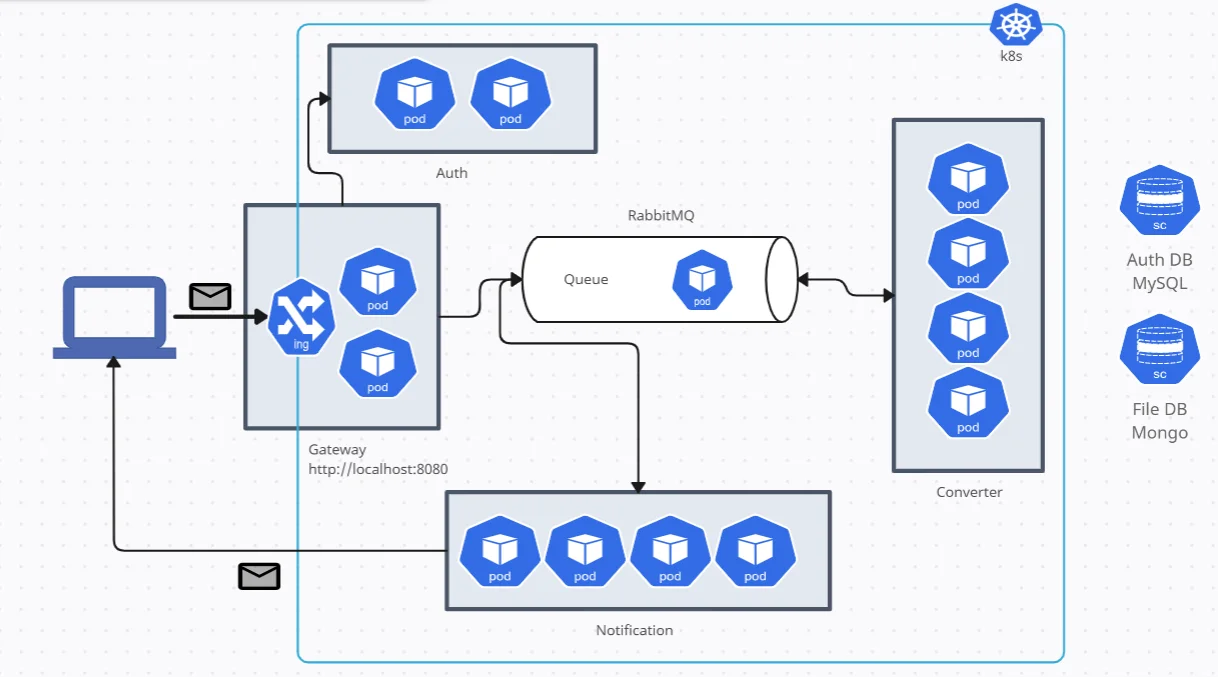
Converting a Word document to PDF sounds trivial until many people do it at once. Conversion is slow and CPU-heavy: each file starts a LibreOffice process. If the web server converted files inline, a burst of uploads would tie up every request thread and time out.
I built this project to learn how to design around that problem the way production systems do. It splits the work into small services, puts a queue between “accept the file” and “do the work”, and lets Kubernetes scale each piece independently.
Five services, one job each
The diagram above shows the full deployment. Each service has its own Docker image, Kubernetes manifests (Deployment, Service, ConfigMap, Secret) and replica count:
| Service | Responsibility | Replicas |
|---|---|---|
| Gateway | The only public entry point, behind an NGINX Ingress. Handles login, upload and download. | 2 |
| Auth | Checks credentials against MySQL, then issues and validates JWTs. | 2 |
| RabbitMQ | The word and pdf queues, run as a StatefulSet with a persistent volume. |
1 |
| Converter | Consumes the word queue and converts files with LibreOffice (unoconv). |
4 |
| Notification | Consumes the pdf queue and emails the user their file ID. |
4 |
Following one file through the system
- UploadGateway validates the JWT, stores the .docx in GridFS
- QueueMessage on the "word" queue
- ConvertA converter pod makes the PDF and stores it
- NotifyMessage on the "pdf" queue → email
- DownloadGET /download?fid=…
1. Upload: accept fast, defer the work
The gateway asks the auth service to validate the bearer token, then stores the uploaded file in MongoDB GridFS, which is built for files larger than a normal document’s size limit. It publishes a small message that points to the file. The response returns immediately; no conversion happens on the request path.
def upload(f, fs, channel, access):
    try:
        fid = fs.put(f)
    except Exception as err:
        return "internal server error", 500

    message = {"word_fid": str(fid), "pdf_fid": None, "username": access["username"]}

    try:
        channel.basic_publish(
            exchange="",
            routing_key="word",
            body=json.dumps(message),
            properties=pika.BasicProperties(delivery_mode=pika.spec.PERSISTENT_DELIVERY_MODE),
        )
    except Exception as err:
        fs.delete(fid)  # don't leave an orphaned file if the message never made it
        return "internal server error", 500
Two details matter here. Messages are persistent, so queued work survives a RabbitMQ restart. And if publishing fails, the stored file is deleted, so storage and queue never disagree.
2. Convert: workers that only acknowledge finished work
Each converter pod consumes from the word queue. A message is acknowledged only after the PDF is stored and the follow-up message is published. If conversion fails, the message is negatively acknowledged and goes back on the queue, so a crashed pod never loses a job.
def callback(ch, method, properties, body):
    err = to_pdf.start(body, fs_word_files, fs_pdfs, ch)
    if err:
        ch.basic_nack(delivery_tag=method.delivery_tag)
    else:
        ch.basic_ack(delivery_tag=method.delivery_tag)

channel.basic_consume(queue=os.environ.get("WORD_QUEUE"), on_message_callback=callback)
The conversion itself shells out to LibreOffice through unoconv, which handles real-world .docx formatting:
command = ['unoconv', '-f', 'pdf', '-o', temp_pdf_file_path, temp_word_file_path]
subprocess.run(command, check=True)

with open(temp_pdf_file_path, "rb") as pdf_file:
    pdf_id = fs_pdfs.put(pdf_file.read())

message["pdf_fid"] = str(pdf_id)
channel.basic_publish(exchange="", routing_key=os.environ.get("PDF_QUEUE"), body=json.dumps(message), ...)
Because RabbitMQ hands each message to one consumer at a time, adding throughput is just a matter of more replicas. A burst of uploads simply makes the queue longer, and the four converters work through it at their own pace instead of the gateway falling over.
3. Notify and download
The notification service consumes the pdf queue and emails the user over SMTP to say their file is ready. The user then downloads it from the gateway with the file ID, again behind JWT validation.
Authentication
The auth service checks credentials against MySQL and issues an HS256-signed JWT with a one-day expiry. Every other request is validated against it before the gateway touches any data:
def createJWT(username, secret, authz):
    return jwt.encode(
        {
            "username": username,
            "exp": datetime.datetime.utcnow() + datetime.timedelta(days=1),
            "iat": datetime.datetime.utcnow(),
            "admin": authz,
        },
        secret,
        algorithm="HS256",
    )
Running it on Kubernetes
Everything runs on a local Minikube cluster with the Ingress, dashboard and metrics-server add-ons. Configuration and credentials are injected through ConfigMaps and Secrets instead of being baked into images. The Ingress is tuned for large uploads and slow conversions: unlimited body size and 600-second proxy timeouts.
spec:
  replicas: 4
  strategy:
    type: RollingUpdate
    rollingUpdate:
      maxSurge: 8
  template:
    spec:
      containers:
        - name: converter
          image: uzyszn/converter
          envFrom:
            - configMapRef: { name: converter-configmap }
            - secretRef: { name: converter-secret }
What I’d do differently today
This was a learning project, and looking back I would harden it before letting real users near it:
- Hash passwords. The auth service compares plaintext passwords; it should store bcrypt or Argon2 hashes.
- Scale on queue depth. Replica counts are fixed. A KEDA autoscaler driven by RabbitMQ queue length would add converters only when work piles up.
- Add a dead-letter queue. Today a file that always fails to convert is retried forever. A retry limit plus a dead-letter queue would surface it instead.
- Clean up temp files on failure. A conversion error currently leaves the temporary
.docxon disk.
What I took away
The core lesson was decoupling with a queue. Once “accept the request” and “do the expensive work” are separate services joined by durable messages and careful acknowledgements, scaling and fault tolerance mostly come for free. Kubernetes then makes each piece independently scalable and replaceable.